- 2015 Batch B pre-mobilization workshop. 21st - 24th July 2015
- Briefing/Sensitization of final year students/ prospective corps members. 4th - 14th August 2015
- Display of list of all approved programmes for institutions on NYSC portal for cross checking 4th - 14th August 2015
- Collation of Prospective Corps Members' Data by Corps Producing Institutions CPIs 31st July - 21st August 2015
- Submission/Uploading of Senate/Academic Board Approved Result for Full/Part-Time Graduates and Revalidation Lists by CPIs 24th August - 2nd September 2015
- Uploading of Corrected Lists by Corps Producing Institutions 1st -7th September 2015
- On-line Registration by Foreign and locally Trained Nigerian Graduates 8th September - 9th October 2015
- Entertainment of complaints from Prospective Corps Members by the state Deployment and Relocation officers and NYSC Help Desks 9th - 16th October 2015
- Forwarding of Complaints to Mobilisation Dept by State Deployment and Relocation officers 9th - 16th October 2015
- On-line Delivery of Print-outs to Corps Producing Institutions CPIs 9th - 16th October 2015
- Deployment and Printing of Call-up Letters by ICT Dept. 14th - 20th October 2015
- Notification/on-line Printing of Call-up Letters 21st - 26th October 2015
- 2015 Batch 'B' Orientation Course (stream I) 28th October - 16th November 2015
- 2015 Batch 'B' Orientation Course (stream II) 25th November - 14th December, 2015
Tuesday, July 28, 2015
2015 NYSC (BATCH B UPDATE)

Federal University of Technology, Akure (FUTA) 2015/2016 POST-UTME

| Application Procedure | ||||||||||||||||
| ||||||||||||||||
Thursday, July 23, 2015
NIGER DELTA POST-UTME FORM FOR 2015/2016 IS OUT

Niger Delta University (NDU) Post UTME Screening Exercise
Application Form for the 2015/2016 academic session is out. NDU cut-off
mark is 180.
This is to inform the general public that the Post-UTME Screening Exercise of the Niger Delta University for the 2015/2016 academic session will take place as indicated below. Suitably qualified candidates are invited to apply.
This is to inform the general public that the Post-UTME Screening Exercise of the Niger Delta University for the 2015/2016 academic session will take place as indicated below. Suitably qualified candidates are invited to apply.
Candidates Eligible for NDU Post-UTME
Candidates who chose Niger Delta University as first choice
Minimum UME score for all candidates is 180
Important Notice –
candidates who chose the following courses are not eligible to take part in the
screening exercise
Educational Management
Computer Science
Geology
Mathematics
Physics
How to Register for NDU Post UTME
Registration is online at www.ndu.edu.ng or
at www.ndu.ac. Starting from Tuesday
21st July to Saturday 15th August, 2015. The Registration Process is
as follows:
There are two options for payment
a) Go to any Diamond, Sky or First Bank branch in Nigeria, along with
your UTME Registration slip. Purchase an e-pin for Niger Delta University
Post-UTME Screening for a fee of Three Thousand Naira (N4,000.00). The
University will not subsidize other charges such as Bank charges.
b) Go to the website webpay.opus.com.ng and
pay for your Pin online using your ATM or Credit card. Instructions as written
on the site. Please ensure you print your payment reference as the
authorization ePin is on it.
Disclaimer: Please protect your ATM and Credit card details. The Niger
Delta University will not be held liable for any incidents.
AFTER PAYMENT
Go online and log onto www.ndu.ac.,
and click on ‘Apply for Post-UTME Screening exercise. Complete the online
application for Post-UTME screening.
APPLICANTS ARE WARNED
The passport photograph will be captured by using a web camera available
on the computer you are using for the online registration. You do not need to
scan a photograph and upload for the registration. Applicants must ensure that
the computer they are using has a web camera.
YOUR CAPTURED PHOTOGRAPH MUST
CONFORM TO THE FOLLOWING
* No Head Cover * Whole of head, ears and neck must show
* Do not wear spectacles
Print out the generated Acknowledgement Letter and your Application form.
Your seat number for the screening exercise will be indicated on the form. You
must bring these (Acknowledgement Letter and Application form) along to the
screening venue. Candidates are advised to make photocopies of the
Acknowledgement Letter and the Application form. Candidates without the
Acknowledgement Letter and Application form will not be allowed to do the
Post-UTME screening exercise.
Notification for Post-UTME Exercise
You will receive a notification through SMS via telephone and by e-mail
indicating whether or not you are qualified to do the screening exercise. The
dates for your screening exercise will also be available on our website www.ndu.edu.ng.
NOTE:
Your application will not be successful if:
Your UTME score is less than 180
The appropriate e-pin is not used
You enter a State or origin different from the one indicated on your JAMB
Registration Form.
Other Important Information Regarding NDU Post UTME.
READ AND FOLLOW THESE INSTRUCTIONS
CAREFULLY:
Passport Photograph, scanned photographs will not be accepted by the
online registration system. Ensure that the computer you are using has a web
camera, which will take your passport photograph, use the same names as you
used in your UTME, Submit two valid e-mail addresses and two GSM phone numbers
in your registration form. (Niger Delta University will not be held responsible
if you use invalid e-mail and telephone numbers).
Schedule of Screening Exercise
Notice of specific days and list of halls of screening will be placed on
the university website from Sunday 16th august, 2015 at the university
gate on the date of screening. Please check for your hall, using your seat
number, date, time and venue of screening exercise will be posted online on our
website www.ndu.edu.ng.
The Screening process is time consuming, given the fact that it involves
Biometric techniques such as finger printing; latecomers will not be screened.
Bring the Following Items for the Screening
HB pencils and erasers.
No biros or pens will be allowed.
Acknowledgement Letter and Application form.
Tuesday, July 21, 2015
AAU POST UTME/DIRECT ENTRY CANDIDATES FOR 2015/2016 SESSION ADMISSIONS
NB: for those that are in benin you can come to shop 17 uniben shopping complex behinde Fidelity Bank to register yours ask of osas. we render online service, typesetting, and design e.t.c

All 2015/2016 UTME candidates who applied to Ambrose Alli University, Ekpoma as Institution of First Choice, with a UTME score of 180 and above are invited to attend a screening exercise in the University on the days stated below.
Screening Time-Table
The screening exercise for the various Faculties is scheduled to take place on the following dates at 9.00 a.m. each day:
Note: Candidates are to check their Examination venues on AAU c-portal on Tuesday, 10th of August, 2015.
Candidates are expected to report at the venues of screening at 7.30 a.m. prompt.
Subject for Screening: Candidates will be screened in subjects relating to their First Choice course of study in Ambrose Alli University, Ekpoma.
Method of Application:
Applicants are required to pay for the Ambrose Alli University, Ekpoma Post UTME on-line application form at a fee of #3,000.00 (Three thousand Naira) only using their ATM Debit Cards on Interswitch or purchase an e-Tranzact PIN Payment Voucher) from any of the under listed Banks Nation Wide.
All candidates are to come to the venues of the screening exercise with the following:
All Direct Entry candidates who applied to JAMB for admission and chose Ambrose Alli University, Ekpoma as Institution of First Choice are also required to complete the Online Application Form for their screening exercise. All such candidates mustupload scanned copies of all relevant certificates/documents to the c-Portal.
*Screening Exercise for Direct Entry (DE) candidates is scheduled to take place from Monday, 24th August, 2015 to Friday, 28th August, 2015 from 9.00 a.m. each day.
Please, be informed that there shall be no Direct Entry into Medicine, Nursing, and Law.
NOTE: All candidates (both UTME and Direct Entry) in addition to note the following:
Acting Registrar
All 2015/2016 UTME candidates who applied to Ambrose Alli University, Ekpoma as Institution of First Choice, with a UTME score of 180 and above are invited to attend a screening exercise in the University on the days stated below.
Screening Time-Table
The screening exercise for the various Faculties is scheduled to take place on the following dates at 9.00 a.m. each day:
| DAY | DATE | FACULTIES |
| 1. | Thursday, 13th August, 2015 | Management Sciences, Arts, Agriculture, Education and Environmental Studies |
| 2. | Friday, 14th August, 2015 | Social Sciences, Natural Sciences & Law |
| 3. | Saturday, 15th August, 2015 | College of Medicine and Engineering & Technology. |
Note: Candidates are to check their Examination venues on AAU c-portal on Tuesday, 10th of August, 2015.
Candidates are expected to report at the venues of screening at 7.30 a.m. prompt.
Subject for Screening: Candidates will be screened in subjects relating to their First Choice course of study in Ambrose Alli University, Ekpoma.
Method of Application:
Applicants are required to pay for the Ambrose Alli University, Ekpoma Post UTME on-line application form at a fee of #3,000.00 (Three thousand Naira) only using their ATM Debit Cards on Interswitch or purchase an e-Tranzact PIN Payment Voucher) from any of the under listed Banks Nation Wide.
All candidates are to come to the venues of the screening exercise with the following:
- UTME e-Registration slip and UTME result slip.
- HB pencil, eraser and biro.
- A print-out of the duly completed Post UTME Online Application Form.
All Direct Entry candidates who applied to JAMB for admission and chose Ambrose Alli University, Ekpoma as Institution of First Choice are also required to complete the Online Application Form for their screening exercise. All such candidates mustupload scanned copies of all relevant certificates/documents to the c-Portal.
*Screening Exercise for Direct Entry (DE) candidates is scheduled to take place from Monday, 24th August, 2015 to Friday, 28th August, 2015 from 9.00 a.m. each day.
Please, be informed that there shall be no Direct Entry into Medicine, Nursing, and Law.
NOTE: All candidates (both UTME and Direct Entry) in addition to note the following:
- Examination study guide: #2,000.00 (Two thousand Naira) only Technology fee: #1,000.00 (One thousand Naira) only; and Bank charges will be charged at the point of purchase of forms online via ATM Debit Cards on Interswitch or e-Tranzact PIN (Payment Voucher).
- All names should be written in full when completing the online application form as no initials shall be entertained.
Acting Registrar
Monday, July 13, 2015
UNIBEN Pre-degree Programme is OUT 2015/2016
In collaboration with the JOINT UNIVERSITIES PRELIMINARY EXAMINATIONS BOARD (JUPEB),
the University of Benin invites applications from suitably qualified
candidates for admission into the Foundation Programmes for the
2015/2016 Session.
The Programme leads to the award of the Joint Universities Preliminary Examinations Board (JUPEB)
Certificate which enables candidates to gain Direct Entry Admission
into 200 level of the degrees offered by the University of Benin and
other JUPEB – affiliated Universities in Nigeria and universities
abroad. The JUPEB Certificate is equivalent to the Advance Level GCE or
the Old Higher School Certificate (HSC) or IJMB.
PROGRAMME DESCRIPTION:
Each candidate admitted into the programme will be exposed to an intensive academic work in three subject combinations relevant to their desired field of study. The subjects are broken into four courses labeled 001, 002, 003 & 004 with each candidate taking six courses per semester making a total of twelve courses at the end of the programme. In addition, candidates will also take at least two general studies courses (one per semester). Each course will be examined at the end of each semester but the results in all the courses taken will be merged at the end of the second semester to obtain a letter grade in each subject (i.e. A, B, C, D, E & F). The general studies to be chosen by each candidate will be based on general courses relevant to the field of study.
For admission into the University of Benin and other JUPEB affiliate institutions, each candidate, in addition to passing the prescribed JUPEB examination for issuing the Direct Entry Certificates, must satisfy all admission requirements prescribed by departments and faculties of choice.
Each candidate admitted into the programme will be exposed to an intensive academic work in three subject combinations relevant to their desired field of study. The subjects are broken into four courses labeled 001, 002, 003 & 004 with each candidate taking six courses per semester making a total of twelve courses at the end of the programme. In addition, candidates will also take at least two general studies courses (one per semester). Each course will be examined at the end of each semester but the results in all the courses taken will be merged at the end of the second semester to obtain a letter grade in each subject (i.e. A, B, C, D, E & F). The general studies to be chosen by each candidate will be based on general courses relevant to the field of study.
For admission into the University of Benin and other JUPEB affiliate institutions, each candidate, in addition to passing the prescribed JUPEB examination for issuing the Direct Entry Certificates, must satisfy all admission requirements prescribed by departments and faculties of choice.
ADMISSION REQUIREMENTS:
Candidates seeking admission into the JUBEP Foundation Programmes must possess minimum of 5 credit passes in at least five (5) subjects at “O” Level, including English language and Mathematics at not more than 2 sittings in the GCE, SSCE (WAEC, NECO, NABTEB).
The following Subject Combinations are available:
| 1. | Arts | - Government / Literature in English / Christian Religious Studies - History / Literature / Christian Religious Studies - Economics, Government / Literature in English |
| 2. | Education | - All the combinations in 1, 3, 4, 5, 6, 7, & 8. |
| 3. | Management / Social Sciences | - Economics / Government / Mathematics - Mathematics / Geography / Economics - Accounting / Economics / Business studies |
| 4. | Law | - Government / Literature in English / Christian Religious Studies |
| 5. | Life Sciences | - Biology / Chemistry / Physics |
| 6. | Physical Sciences | - Chemistry / Mathematics / Physics - Geography / Mathematics / Physics |
| 7. | Medicine/ Dentistry / Pharmacy / Nursing |
- Biology / Chemistry / Physics |
| 8. | Engineering | - Chemistry / Mathematics / Physics |
All the combinations above meet the entry requirements for direct
admission into Degree Programmes in the University of Benin and other
JUPEB affiliate Universities which include, OAU, UNILAG, UNN, UYO, FUTA, FUNAAB, etc.
DURATION OF PROGRAMME:
The duration of the study is a minimum of one Academic Session of TWO SEMESTERS. It is strictly non-residential programme.
MODE OF STUDY:
Face to face contact at the University of Benin or other designated venues. Lectures will be conducted from 3pm – 6pm, Monday to Friday.
METHOD OF APPLICATION:
Interested candidates are to purchase application forms online from the university web site www.uniben.edu with valid VERVE VISA OR MASTERCARD ATM BANK CARD from any commercial bank in Nigeria for the non-refundable application fee of fifteen thousand naira (
The Application form must be correctly filled with all information required before submitting online and thereafter printed out.
On the UNIBEN website,
- Click on the WAEUP PORTAL LINK
- Click on the FOUNDATION PROGRAMME (JUPEB) APPLICATION 2015/2016 Link.
- Click on REGISTER FOR APPLICATION and fill out application after reading instructions on the page.
- Upload a recent coloured passport size photograph (scanned, not more than 3 months old passport) with red background. Webcam photograph is not acceptable.
- Submit the online application form and print out a copy of the examination schedule slip which should have your user name and password.
Note:
- Fill your Bio-Data correctly as no complaint about wrong bio-data will be entertained after submission.
- Candidates who upload wrong bio-data will be disqualified and forfeit application fee.
- Only coloured print out will be accepted.
- Print at least 4 copies of the University of Benin online registration form with complete passport size photograph printed in colour.
- All candidates are required to use valid e-mail addresses and Telephone numbers.
- Candidates are to follow the application instructions very carefully and ensure they select the subject combinations relevant to their course of study.
Application Closes at Midnight on Sunday August 7th 2015
Entrance Examination:
The Entrance Examination into the Foundation Programme will hold at the University of Benin on Saturday August 15th 2015.
UNIBEN CBT PRACTICE TEST
The University of Benin (UNIBEN) CBT PRACTICE TEST for 2015/2016
Academic Session opens for INTERESTED candidates. This test can be
taken online from anywhere you have access to the internet on the web
site cbt.uniben.edu
PLEASE NOTE: This is a Practice test on Computer Based Test
which is open to the general public. It is an exposure to the use of CBT
for common entrance screening tests and all other computer based
examinations.
Application opens with effect from Tuesday 7th July, 2015. Candidates are advised to have a valid e-mail account before starting the application process
METHOD OF APPLICATION:
The procedure for the 2015/2016 UNIBEN CBT Practice Test application is as follows:
1. Visit www.uniben.edu
2. Click on WAEUP Portal
3. Click on Register for application at the top left of the display page to proceed
4. Enter your Surname, First Name and Other Name as it is written on the JAMB Registration slip and your JAMB Registration number.
5. Immediately, your ID and Password will be displayed on the browser.
6. On the application page, click on ‘Login’ (top right of front page)
7. Enter your Username and the password to login.
8. To start the application process, please click on ‘Application record’, provide all required information and upload your passport photograph.
9. Upload a RECENT and CLEAR “1x1” COLOUR PASSPORT PHOTOGRAPH WITH RED BACKGROUND IN JPEG FORMAT ONLY.
10. To pay for the Application, click on “Add online payment ticket” at the bottom of the page, then click on “College Pay” on the top left corner of the page, follow the instruction to pay the application fee with an ATM-Enabled Verve or Master Card from any Commercial Bank.
11. Preview and confirm your information before submitting your application online.
12. Come back to cbt.uniben.edu to take your practice test 24 hours after your application.
13. You are entitled to one practice test per application. You can however apply more than once.
14. Application website closes by 12 Midnight on 2nd August, 2015.
NUC to Introduce e-Learning in Federal Universities, Polytechnics
National Universities Commission (NUC) has said it would introduce
electronic education programme otherwise called "e-learning” in all
federal universities, polytechnics and colleges of educcation in the
country.
The e-learning, an initiative aimed at creating linkages between
universities, polytechnics and colleges of educations in Nigeria with
their peers overseas was first launched at the University of Benin last
year
Coordinator of the e-learning Programme, University of Benin, Idon
Akogun disclosed this on Friday in Benin City at the launch of the
second phase of programme.
To ensure its workability, Akogun said NUC was seeking funding from
the Tertiary Education Trust Fund (TETFUND) to have a pilot project in
each of the geo-political zones.
"We are hoping that very soon, the TETFUND will approve such a
request and bring this project to each zone of the country and show the
benefits of having an international component in each of our
universities.
"That way, our students cannot just leave the universities with their
degrees, but have an international component to that degree; they will
be able to compete with students all around the world", he stated.
Akogun said he believed that having a programme like that, Nigeria
would have a better labour force ready for the change that was going
through right now and Nigerian graduates would be well equipped to face
the future.
According to him, apart from the pilot programme which began at the
University of Benin, "We have had letters of interest from the Ahmadu
Bello University, University of Port Harcourt, University of Ilorin and
Uthman Danfodio University. From there, it will be extended to other
institutions around the country".
Noting that the maiden programme was very successful, the e-learning
coordinator said the technology proved many skeptics wrong that Nigeria
was more than capable of sustaining ICT.
He said: "All over our country, people play with their cell phones,
they are on social media. So, we have to enhance the classroom. We
cannot expect our society today to be moved by technology without our
education moving in that same vein".
However, Akogun acknowledged there had been setbacks and shortcomings
that had to do with equipment, size of the TV screen, speakers and
erratic power supply.
In order to overcome these problems especially electricity supply, he
said they had to rely on the use of generator for the entire course of
the day as well as setting up a modernised multi-media centre so that
every student could see and hear clearly from all sides of the class
what the faculty abroad was saying.
"So, if the programme is running for a two-hour session, we use
generator throughout that period until we are able to get ultimate
power, like solar panels or other avenues to sustain the programme",
adding that the one week programme was borne out of a partnership with
UNIBEN and Lincoln University, USA which feature lectures on the global
perspective of nanotechnology by Dr. Zahra Asrasiabi from Lincoln
University.
He explained that nanotechnology was a new technology that has been
used in the United States and all around the world for manufacturing and
production.
On the cost implication of the programme, Akogun revealed that students did not pay for the programme because the Chairman of the Governing Council and the Vice-Chancellor of the University of Benin took it upon themselves to make sure that the programme was fully funded by the university.
On the cost implication of the programme, Akogun revealed that students did not pay for the programme because the Chairman of the Governing Council and the Vice-Chancellor of the University of Benin took it upon themselves to make sure that the programme was fully funded by the university.
"But the financial cost of the project depends on the courses chosen
by the participating tertiary
institutions in Nigeria. If a Nigerian
tertiary institution wants five courses in the sciences, it would be
different from being interested in fewer courses. But what we want to
achieve is to make sure that if the schools cannot afford it in the long
run, the government can come in to assist the students. In most cases,
we want each of the students that participated in week-long programme to
receive a certificate of completion from the foreign university
partner", he said.
Responding, one of the benefiting students, Obaka Odafisamon, final
Year., Dept of Biochemistry, Faculty of Live Sciences, described it as a
wonderful programme as it had afforded him the opportunity to hear
first-hand from a professor at Lincoln University, USA via words,
pictures and practical demonstrations.
Besides, he said they also had the opportunity to ask questions and
those things they did not know about which the lecturer explained.
Also, Kelechi Temitope of the same department and faculty said he
gained a lot of knowledge about nanotechnology and from the teaching
technique which was obviously different from the one they were used to
in their classroom.
"This one makes it much easier to understand the concept and very
interesting to learn. It is not like the normal boring lecturers we are
used to in our classrooms. It is easier to follow the lecturer,
basically", he said.
Friday, July 3, 2015
FREE MTN 7.5GB AND MORE

Get a new MTN sim card I mean new MTN sim card and register it not old one ooooooo because it wouldn't work.
Now text this following word:
- Text SPB to 131 for 2GB
- text 101 to 131 or *101# for 7.5GB
- text 300H to 131 to get 300hours of free browsing
NOTE: each of the code is for different simcard i.e if you gotten 2gb from the first code it wouldn't work for the second code again.
If you get insuficent fund just keep trying later dial *131*4# to check your data bundle chikina.
Please don't forget to leave a comment if it work for you.
if i see your testimonies i will add more cheat like getting N5000 free call, 2500 sms and 10gb
Wednesday, June 17, 2015
How to Hard Reset Nokia X and Some Lumia Phone
Hard Reset your Windows Phone will return it to the same state it was the first time you bought the phone. All your personal content will be erased, and
the phone will be restored to its factory settings.
If you decide to reset your phone, you can back up apps, text messages,
photos, and more to your Microsoft account in the cloud beforehand. To learn
more about how this works (i will posting it on my next post)
WARNING
Be careful Hard Reset your phone will erase all content stored on
your phone, including apps and games (along with app data and game progress),
text messages, call history, music, photos, and more.
Procedure to Hard Reset your Nokia x/lumia Phone
2. Press and hold the volume up key and the power key for about 1 second.
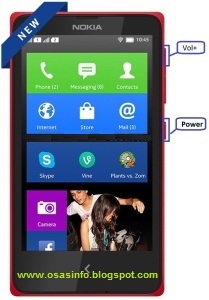
3. When the phone vibrates, release the power key, but continue holding the volume up key,
until the phone is fully booted up. This procedure will boot the phone in recovery mode.
4. Use the volume up/down keys to navigate through the menu and select the wipe data/factory
reset option.

5. Delete all user data and press Power key to Confirm.

6. After delete all user data select reboot system now and press Power key.
7. Now your Nokia X/Lumia Phone will reboot.
8. Your windows phone is now ok.
if this post have help you out don't forget to share with friends on facebook, twitter, google+ etc

Friday, May 22, 2015
Whatsapp Free Browsing on your PHONE
Get One Month free whatsapp chaton your PHONE with MTN NIGERIA Line, by just sending this message
WAMS to 131
You will get a reply saying “your request has been processed and you will receive a reply shortly”
thats all and after that you will recieve a successful message
How to Check you whatsapp data
To check your whatsapp data bundle Just dail
*559*2#
WAMS to 131
You will get a reply saying “your request has been processed and you will receive a reply shortly”
thats all and after that you will recieve a successful message
How to Check you whatsapp data
To check your whatsapp data bundle Just dail
*559*2#
Tuesday, May 19, 2015
Procedure to Follow Before you make WhatsApp CALL
Recently, i was discussing with a friend of mine about the whatsapp voice calling and he was like telling me that it is not working that he has tried it lot of time but it didn't work.
That why i decide to write this article on procedure to follow before you can make phone call with your whatspp

WhatsApp, the most popular messaging app in the world with
over 700 million monthly active users, recently introduced voice calling feature and initially it was available to only a handful of users. However, WhatsApp free voice
calling is now available to all Android users.
If you are not an Android user you'll
have to wait a while to get this feature. But if you use Android, and haven't
yet activated voice calling on WhatsApp, you can follow this procedure.
- Download the latest version of WhatsApp for Android from here. The latest version on WhatsApp 2.12.84 as of today Note: Older versions don't support this feature for all users.
- Once you have the latest version of WhatsApp installed
on your Android phone, ask someone who has WhatsApp calling enabled to
make a WhatsApp call to your number.
- Multiple users have reported that giving a missed call
doesn't work. You'll have to receive the call and wait for a few seconds
before disconnecting to activate WhatsApp voice calling.
- When the feature is enabled on your smartphone, you'll
see a new three-tab layout on WhatsApp, one each for Calls, Chats and
Contacts.
Tuesday, May 12, 2015
STEP TO CHANGE YOUR ANDROID PHONE AND OTHER MTK PHONE IMEI NUMBER TO BLACKBERRY IMEI
Formely Andriod user can browse with bb subscription on their phone but now due to the restriction of mobile network in Nigeria Andriod user can no longer browse with bb plan on thier phone. Here i will show step on how to use your glo bb pland to browse on your andriod phone.
Note: I won’t be responsible for any damage this tutorial cause on your android phone. Also, changing of IMEI is illegal in some countries, and I will not be held responsible if you go to jail.
First and foremost, write down your original imei number and keep it safe
In this tutorial, you will learn how to:
1. Generate your own blackberry imei number and a pin with pc and phone or you can copy a
friends bb imei
2. Change your andriod imei number with the bb imei you generated directly on your phone
HOW TO GENERATE A BLACKBERRY IMEI NUMBER
WITH PHONE:
* Goto google playstore search for bb imei generator and download it
* After downloading open and tap the Generate Bb IMEI to generate the bb imei number
WITH PC
* Download this software GIP v4.1 here
* Unrar the file and copy and paste the three .sys files inside the folder to your C:\Windows folder
* Then double click on GIPv4.1 to open
* Click on Generate imei, don’t mind the complaint, Click on Continue
* Write down the Blackberry imei number generated and maybe the pin too (if you feel like eating
it…lol).
HOW TO CHANGE YOUR ANDROID IMEI NUMBER TO BB IMEI
1. Go to play store and install Mobileuncle or MTK Engineering tool if you don’t have it
2. Open the MTK Engineering mode click on MTK Setting.
3. Move to Connectivity and Click on CDS information
4. Click the Radio information and you will get phone 1 and phone 2.
5. To change sim 1 imei number to blackberry, touch phone 1 and in the box, touch the AT+
6. Once you touch, the Keyboard will popup. In the keyboard type any single letter and use
backspace to remove the letter you have type. Immediately you will notice a popdown menu
select the first which is AT+EGMR=1,7""
7. Type the Blackberry imei number you generated into the quote "" (e.g
AT+EGMR=1,7"354872134512xxx"
8. Click the SEND AT COMMAND
9. To change sim 2 imei goto step 5 select phone 2 and in the box, touch the AT+
10. Once you touch, the Keyboard will popup. In the keyboard type any single letter and use
backspace to remove the letter you have type. Immediately you will notice a popdown menu this
time select the one with AT+EGMR=1,10""
11. Type the bb imei no. you generated into the quote ""(e.g AT +EGMR=1,10"354872134512xxx")12. Once the pop up display indicates AT command successfully send.
13. Reboot your phone/off switch off the airplane mode and on back enjoy.
12. IF YOU WANT TO CHANGE BACK YOUR IMEI TO THE ORIGINAL ONE, JUST
REPEAT THE PROCEDURE USING YOUR REAL IMEI
you can also add contribution to this post if you think there is something i miss thanks.
Subscribe to:
Posts (Atom)